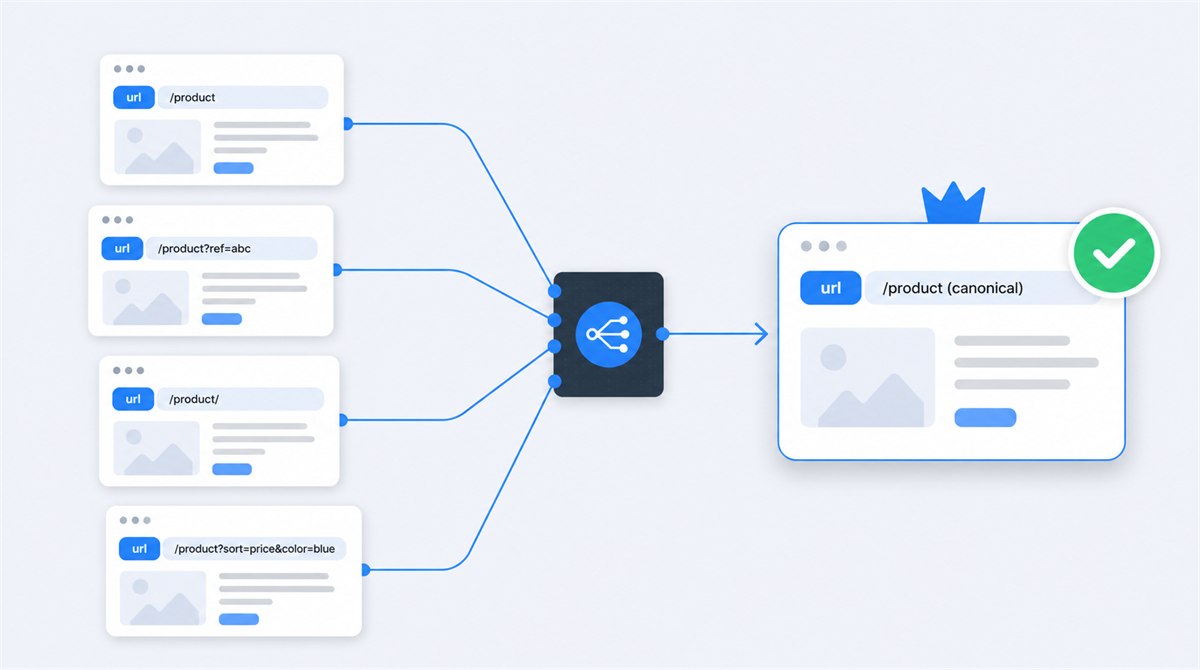
A canonical URL is the representative version of a duplicate or very similar group of pages. If a product can be reached through its clean URL, a tracking parameter, a category path and a print view, search engines should not treat those as four separate pieces of content. Canonicalization helps them consolidate the group and decide which URL to show.
The HTML used to suggest that preference is commonly called a "canonical meta tag." That name is convenient and technically wrong. It is a <link> element with rel="canonical", normally placed in the document <head>. A real meta tag begins with <meta>, like the description or robots tag. Knowing the difference makes implementation and debugging much easier.
What a Canonical URL Actually Does
During indexing, Google groups pages it considers duplicate or very similar. It then selects a canonical: the page it considers the best representative of that cluster. Signals associated with alternate URLs, including links, can be consolidated toward the canonical, and Google generally shows the selected URL in search.
Your declaration does not force that choice. Google's canonical documentation calls redirects and rel="canonical" strong signals and sitemap inclusion a weak signal. These can stack. Google can still select another URL when the pages are not actually similar or when your signals disagree.
That distinction explains the two fields in Search Console: User-declared canonical is the URL your page or sitemap suggests; Google-selected canonical is the URL Google ultimately chose. A mismatch is not automatically an error, but it is evidence worth investigating.
Why Websites Create Duplicate URLs
Duplicate content is often a routing problem, not copied writing. One page can collect many addresses as platforms add tracking, sorting, filtering and alternate paths:
https://example.com/shoes/blue-runner/https://example.com/shoes/blue-runner/?utm_source=emailhttps://example.com/products?id=184https://example.com/sale/blue-runner/https://www.example.com/shoes/blue-runner
Other sources include HTTP and HTTPS versions, www and non-www hosts, uppercase and lowercase paths, trailing-slash variations, printer pages, downloadable formats, session IDs, faceted navigation, syndication and near-identical product variants. The issue is not a mythical "duplicate content penalty." The practical costs are divided signals, inconsistent reporting, wasted crawling and the wrong URL appearing in search.
Before choosing an implementation, use the duplicate content decision guide to decide whether the pages should stay separate, be combined or use one representative URL.
How to Implement rel="canonical" Correctly
Place one canonical link element inside the valid <head> of every indexable HTML page:
<link rel="canonical"
      href="https://example.com/shoes/blue-runner/">
Use an absolute HTTPS URL including the preferred host and path. Relative canonicals are supported, but Google recommends absolute paths because a staging host, unexpected base URL or template reuse can turn a harmless shortcut into a sitewide error.
Use a self-referencing canonical on the preferred page
The clean page should point to itself, while true duplicate versions point to that same clean URL. Self-references make the preference explicit and protect against unplanned parameter variants. They also give automated crawlers and audit tools a simple expected state.
Choose one URL
Decide the HTTPS host, case, path and trailing-slash format that should represent the page.
Align every signal
Canonical element, redirects, internal links, sitemap and hreflang should agree.
Verify Google's choice
Crawl the site, then compare declared and selected canonicals in Search Console.
The Canonical Signals Google Uses
Google publishes a useful order of influence. A redirect is a strong signal because the old URL no longer serves its own page. A rel="canonical" link annotation is also strong. Sitemap inclusion is weaker because a sitemap lists preferred URLs without explicitly mapping each duplicate.
Signals that should agree
- Permanent redirects point to the preferred URL
- Every duplicate declares the same canonical
- The canonical page self-references
- Internal links use the canonical URL
- Only canonical URLs appear in the sitemap
- Hreflang references canonical language URLs
Conflicts to remove
- Canonical points to A while sitemap lists B
- Redirect destination canonicals back to the source
- Internal navigation links mostly to parameters
- HTTP page canonicals to HTTPS but HTTPS redirects back
- Two canonical elements name different URLs
- Canonical target returns an error or noindex
Consistency is more important than cleverness. If your canonical says one thing but every internal link, redirect and sitemap says another, you have made Google solve a contradiction. The internal linking guide explains how to audit those paths. Link to the URLs you want indexed, and keep only those URLs in your XML sitemap.
Canonical vs Redirect vs Noindex
These controls solve different problems:
- Use a permanent redirect when the alternate URL should disappear for visitors and search engines. Old slugs, HTTP versions and retired duplicate pages belong here.
- Use rel="canonical" when alternate versions must remain accessible but represent substantially the same content. Tracking parameters, print versions or the same product under several category routes are common examples.
- Use noindex when a page may remain accessible but should not appear in search and there is no equivalent page whose signals should absorb it. Account pages, thin internal results and private utility screens often fit.
- Use robots.txt to manage crawling, not canonical selection. Blocking a duplicate can prevent Google from seeing the canonical element on it.
A canonical does not redirect a browser. Visitors can still open the alternate URL. A redirect does. If keeping the duplicate accessible serves no user purpose, a redirect is usually clearer and easier to maintain. See the HTTP status code guide for the redirect side of that decision and the robots.txt guide for crawl control.
How Canonicals Work in Common Situations
Tracking and sorting parameters
A URL with ?utm_source=newsletter usually shows the same page as the clean URL, so both can declare the clean URL canonical. The same often applies to sort order. Filters are different: a filtered category may satisfy a valuable distinct search intent. Decide from the content and user value, not from the presence of a question mark.
Products in several categories
If the same product content appears under several category paths, choose a stable product URL and canonicalize alternate routes to it. Better still, make the stable URL the one your internal links use. Canonical tags should not compensate forever for an avoidably inconsistent architecture.
Product variants
Canonicalize color or size variants only when the pages are truly interchangeable. If each variant has unique availability, images, identifiers, content and search demand, separate self-canonical pages may be correct. A canonical is not a rule that every product family gets one URL.
Pagination
Do not canonicalize every page in a sequence to page one. Google's current pagination guidance recommends a unique URL and self-referencing canonical for each page. Page two contains different items and helps crawlers reach deeper content; it is not a duplicate of page one.
Syndicated articles
A cross-domain canonical can suggest that the original article should receive the consolidated signals, but publishers must implement it and search engines still decide. If you need certainty that a partner copy cannot appear, contractual noindex or removal is stronger than hoping a canonical is honored.
PDFs, JavaScript and International Sites
Canonical HTTP headers for non-HTML files
A PDF has no HTML head, so you can send a canonical in the HTTP response:
Link: <https://example.com/research/report/>; rel="canonical"This is useful when an HTML landing page and downloadable document contain the same material. Google recommends choosing either the HTML element or HTTP header for a resource rather than maintaining both and risking conflicting values.
JavaScript-generated canonicals
Google can process canonicals injected by JavaScript, but its guidance is to put the canonical in source HTML when possible and prevent JavaScript from changing it. If the source cannot contain one, inject one clear value rather than shipping a source canonical that JavaScript later replaces.
Hreflang and language versions
International pages usually self-canonicalize within their own language and reference their alternates with hreflang. Do not canonicalize every translation to the English page, because that tells Google the translations are duplicates to consolidate. Google's guidance says hreflang pages should specify a canonical in the same language whenever one exists.
The hreflang implementation guide shows a complete three-language example, return links, x-default and validation checks.
How to Test Canonicals Properly
- Crawl the entire site. Export each URL, status code and declared canonical. Look for missing values, multiple values, chains, loops and targets outside the intended host.
- Validate the rendered head. The canonical must appear inside a valid
<head>. Browser repair of broken markup can move elements into the body, where Google may ignore them. - Check every target. A canonical target should normally return 200, be indexable, contain equivalent content and self-reference. Do not point to a redirect, 404, noindex page or irrelevant category.
- Compare internal signals. Count internal links to duplicate versus canonical URLs and inspect the sitemap. Fix templates at the source instead of accepting thousands of mixed URLs.
- Use URL Inspection. Google's URL Inspection documentation explains the declared and selected fields. Inspect the indexed version, because the live test cannot predict Google's final canonical choice.
My free TechSEO Inspector shows the canonical declared on any page alongside its indexability signals. That is a quick page-level check; a full canonical audit still needs a crawl because the dangerous patterns appear across groups of URLs.
Canonical Mistakes I Keep Finding
- Every page points to the homepage. This does not make the homepage stronger. It tells search engines that distinct content should be treated as duplicate and is commonly ignored.
- Staging canonicals survive launch. A copied template keeps
staging.example.comin the head and sends every production preference to a host that should never be indexed. - A single hard-coded canonical across templates. Hundreds of products all point to whichever URL the developer used while testing.
- Canonical chains. Page A points to B, which points to C. Point every duplicate directly to the final canonical.
- Mixed URL formats. HTTPS canonicals coexist with HTTP internal links, slash and non-slash versions, or inconsistent capitalization.
- Canonicalizing genuinely different pages. Category, location or variant pages with distinct intent are collapsed because they share a template.
- Using noindex and canonical together. One instruction says remove this URL; the other asks to consolidate it. Use the control that matches the goal.
- Blocking duplicates in robots.txt. Google cannot fetch the page to see its canonical element, leaving weaker external clues to determine the cluster.
- Trusting the tag without checking Google's choice. Clean source code is not the outcome. The selected canonical in indexed Search Console data is the outcome.
Canonical URL Implementation Checklist
Run this before releasing a template
- Exactly one
rel="canonical"appears inside the valid HTML head - The href is an absolute HTTPS URL using the preferred host and format
- Every indexable canonical page self-references
- Duplicate pages point directly to one equivalent preferred URL
- The target returns 200, is indexable and has equivalent content
- Internal links, redirects, sitemap and hreflang agree with the canonical
- Paginated pages and distinct variants are not incorrectly collapsed
- Search Console confirms the intended Google-selected canonical
Are Your Pages Sending Mixed Canonical Signals?
Canonical problems rarely live on one page. I trace templates, parameters, redirects, sitemaps and internal links together, then identify exactly where the signals split. Request a free website review and I will check the pattern, not just the tag.
Request a free reviewCanonical URLs: FAQ
<link rel="canonical" href="https://example.com/preferred-page/">.Need to choose between keeping an alternate URL and moving its visitors? Read Canonical Tag vs. 301 Redirect: Which Should You Use? for worked examples and a verification checklist.

I'm a developer who moved into technical SEO. Canonicals are where code, site architecture and search behavior collide, so I audit them as a system: templates, redirects, sitemaps, internal links and Google's selected URLs. Request a free website review and I'll inspect yours personally.