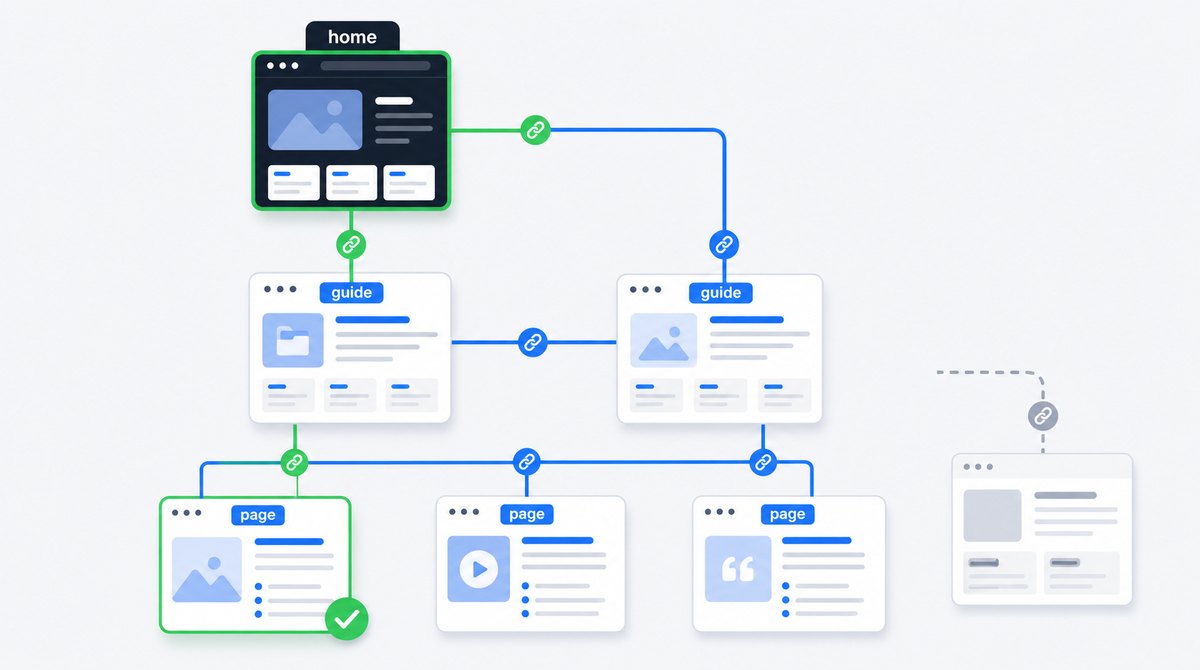
An internal link points from one page on your domain to another page on the same domain. Navigation menus, breadcrumbs, category lists, body links and related-content cards are all internal links. Their job is not simply to move abstract "SEO value." A useful internal link helps a reader take the next logical step while giving a crawler a resolvable route and context about the destination.
Google says links are used to find new pages and as signals when determining relevance. Its current link best-practices documentation also says every page you care about should have a link from at least one other page on your site. That is the useful starting point: make important content reachable, then make each link understandable.
What Internal Linking Actually Does
Picture a website with fifty excellent articles and no menu, category pages or links between them. Each URL may load and appear in an XML sitemap, but the experience is still a box of loose pages. A visitor has nowhere useful to go next. A crawler receives a list without understanding how the pieces relate.
Internal links create those relationships. A beginner's guide can link to a detailed implementation page. A product category can link to each product. A service page can link to a case study that proves the work. The destination becomes discoverable, while the anchor text and surrounding sentence explain why it is relevant.
This is why internal linking belongs to both technical and content SEO. The technical layer makes the link crawlable and points it at a healthy canonical URL. The editorial layer chooses a destination that genuinely helps the reader and describes it accurately.
The Three SEO Jobs of an Internal Link
Discovery
A crawlable link gives Googlebot a route to a URL it may not know yet.
Context
The anchor and surrounding copy describe the destination and its relationship to the source.
Importance
Your link structure indicates which pages are central and which are supporting detail.
Google's developer guide explains that Googlebot navigates from URL to URL using links, sitemaps and redirects. The broader guide to crawling, indexing and ranking shows where internal links enter that pipeline. Discovery is only the first benefit. Google also analyzes the relationships between pages and can use link counts and click depth as clues to relative importance, particularly on large sites.
That does not mean adding one hundred links guarantees rankings. A link can help Google understand a page without making it the best answer for a search. Content quality, intent, external signals and many other systems still matter. Internal linking makes a good page easier to find and interpret; it cannot rescue an unhelpful page by itself.
Build Links Crawlers Can Reliably Follow
The safest internal link is ordinary HTML: an <a> element with an href that resolves to a real URL and visible anchor text between the opening and closing tags.
<a href="/internal-linking-seo-guide/">
  internal linking guide
</a>
Relative URLs like the example above are fine when your templates resolve them correctly. Absolute URLs are also crawlable. Whichever style you choose, link to the preferred HTTPS URL and keep its host, path case and trailing-slash format consistent with the page's canonical URL.
Reliable patterns
<a href="/services/">technical SEO services</a>- Text links present in the rendered HTML
- Linked images with descriptive alt text
- Menu and breadcrumb anchors with real destinations
- URLs that return a healthy final page
Fragile patterns
- A clickable
<div>with no anchor - An
<a>with only an onclick event - A URL available only after submitting a search form
- Empty anchors with no text or image alt
- Links that lead through avoidable redirect chains
JavaScript can insert a perfectly crawlable anchor, but the final rendered markup still matters. If navigation depends on JavaScript, inspect the rendered HTML with Search Console's URL Inspection tool. A component that works after a human click may still be absent or unusable when a crawler renders the page.
Build a Logical Site Structure Before Adding Body Links
Good architecture gives every important page a sensible parent and a short path from a strong entry point. A small service website might use Home to Services to Individual Service. A content site might use Home to Topic Hub to Detailed Guide. An ecommerce site commonly uses Home to Category to Subcategory to Product.
Google's SEO Starter Guide recommends organizing a site logically so people and search engines can understand how pages relate. Its ecommerce guidance goes further: navigation and cross-page links can affect Google's understanding of structure, and products should be reachable through category browsing rather than only through an internal search box.
- Use hubs for real topics. A useful hub introduces the subject, groups related pages and helps visitors choose where to go.
- Keep important pages close. If a primary service takes six clicks to reach, the structure is probably describing it as less important than you intended.
- Link sideways when it helps. Two related articles can link to each other even when neither is the other's parent.
- Do not force every page into the main menu. Global navigation should stay usable. Contextual links and hubs can expose deeper material.
- Keep utility pages in proportion. Login, privacy and filter URLs may need links, but they should not dominate the architecture.
Write Anchor Text That Explains the Destination
Anchor text is the clickable wording of a text link. Google recommends wording that is descriptive, reasonably concise and relevant to both the current page and the destination. The surrounding sentence matters too. It tells a reader why the link belongs there.
Clear anchors
- how Google Search works
- canonical URL implementation guide
- XML sitemap checklist
- reasons a page is not indexed
- free website review
Weak or forced anchors
- click here
- this article
- website
- a sentence-long block of linked text
- the same exact keyword forced into every page
You do not need one exact anchor for a destination. Natural variations often describe different reasons to visit the same page. A canonical guide might be linked as "canonical URL guide" in one article and "how to fix conflicting canonical signals" in another. Both can set a clear expectation.
Avoid treating anchor text like a keyword field. If the sentence sounds unnatural when read aloud, rewrite it. Google's guidance explicitly warns against cramming keywords into links. Clarity beats repetition.
Choose the Right Source Page and Placement
A relevant link inside the main content usually carries more explanatory context than a generic footer link. That does not make navigation or footer links useless. Each placement has a different job:
- Primary navigation exposes the sections and commercial pages most visitors need.
- Breadcrumbs show the current page's place in a hierarchy and offer a route upward.
- Hub and category pages distribute visitors into a coherent topic or product set.
- Contextual body links connect a specific sentence to a useful explanation, service or supporting source.
- Related-content cards offer optional next steps after the main task is complete.
- Footer links provide stable access to key utilities and selected sections, but should not become a dump of every URL.
When you publish a new page, start with pages that are both relevant and already discoverable. Add a link where the new destination genuinely completes an explanation. Then update its hub or category and any global discovery surface it actually belongs in. A sitemap entry supports discovery, but it does not replace these relationships. See the XML sitemap guide for that division of labor.
For an established page that needs more visibility, look for strong pages covering an adjacent need. Use the search intent framework to decide whether a reader would naturally benefit from the destination. Do not insert unrelated links into top performers only because they receive traffic. The source, anchor and destination should form one useful thought.
Find and Fix Orphan Pages
An orphan page has no crawlable internal link pointing to it. It may exist in your CMS, analytics, sitemap or backlink data, but it sits outside the navigable structure. Important orphan pages are harder for people to find and provide weak internal evidence of importance.
A crawler alone cannot give you a complete orphan list because it finds pages by following links. Compare several sources:
- Crawl the site from the homepage and approved entry points.
- Export canonical indexable URLs from the XML sitemap.
- Export known URLs from your CMS, ecommerce platform or database.
- Add pages seen in analytics and Search Console.
- Compare the sets. A known indexable URL missing from the crawl is a candidate orphan or a page behind an inaccessible route.
Not every orphan should be linked. An expired campaign, private utility or obsolete duplicate might need removal, a redirect or noindex instead. Decide whether the page deserves to exist first. If it does, add it to the most relevant hub and link from one or more pages where readers need it.
If a useful page is discovered but not indexed, weak internal linking is one possible cause among many. The page indexing troubleshooting guide explains how to separate discovery, crawling, canonicalization and quality problems.
How to Run an Internal-Link Audit
A useful audit is not a report containing the site's total number of links. It should tell you which important pages are isolated, which URLs receive conflicting signals and which templates create avoidable waste.
- Define the preferred URL set. Start with indexable canonical pages that serve a distinct user and search purpose.
- Crawl rendered internal links. Record source URL, destination URL, anchor text, placement, response status, canonical and indexability.
- Fix broken destinations and chains. Update links to point directly at the final healthy canonical URL instead of relying on redirects.
- Find pages with zero or very few inlinks. Review importance and intent before adding links.
- Review click depth. Check whether business-critical and high-value informational pages sit behind unnecessary layers.
- Inspect anchor distribution. Look for vague wording, template repetition and anchors that describe a different intent from the destination.
- Separate global from contextual links. Thousands of footer links do not provide the same context as a relevant editorial link.
- Compare links with canonical and sitemap signals. Internal links should normally point to the same URLs you declare as canonical and submit in your sitemap.
- Prioritize by page purpose. Fix orphaned services, products and proven guides before low-value archive pages.
- Recrawl and measure. Confirm the new paths exist, then monitor crawling, index coverage and page-level search performance without promising an instant ranking change.
Small sites can perform much of this review manually with a crawler and spreadsheet. Larger ecommerce and publishing sites need template-level analysis because a single navigation, related-product or pagination rule can generate millions of link relationships.
Internal-Linking Mistakes I Keep Finding
- Publishing orphan pages. The new article enters the sitemap but no hub, category or related page links to it.
- Linking to redirected URLs. The destination eventually works, but every click and crawl takes an unnecessary hop.
- Sending mixed canonical signals. Templates link to parameters or HTTP URLs while canonicals and sitemaps declare clean HTTPS versions.
- Using buttons without anchors. JavaScript navigation looks correct to users but does not produce reliable
<a href>markup. - Repeating exact anchors mechanically. Every page inserts the same keyword-heavy sentence whether it helps the reader or not.
- Adding links by quota. Writers are told to add ten internal links, so they choose irrelevant destinations to satisfy the number.
- Putting every URL in the footer. The footer becomes unusable and the site still lacks topic-specific relationships.
- Applying nofollow internally by default. Ordinary site links are weakened without solving indexing or crawl-control goals.
- Linking heavily to pages that should not rank. Faceted URLs, internal search results and duplicate variants absorb attention while canonical pages stay buried.
- Auditing links without page intent. A tool reports counts, but nobody asks which URL should own each search and user need.
Internal-Linking Checklist for Every New Page
Run this before publishing
- The page serves a distinct intent and has one preferred canonical URL
- Its hub, category or another discoverable page links to it
- At least one contextual link explains why a reader should visit it
- Every link uses a real
<a href>destination - Anchor text is concise, descriptive and natural in its sentence
- Outbound internal links point directly to healthy canonical URLs
- The page links onward to genuinely useful related resources
- Mobile navigation and rendered HTML expose the intended paths
- The canonical URL is included in the sitemap when appropriate
Do Your Important Pages Have a Clear Path?
An internal-link problem is rarely visible from one URL. I crawl the full site, compare links with canonicals and sitemaps, find orphaned pages and trace the templates creating mixed signals. Request a free website review and I will identify the highest-impact fixes personally.
Request a free reviewInternal Linking for SEO: FAQ

I'm a developer who moved into technical SEO. Internal linking is where information architecture, HTML and content strategy meet, so I audit the actual paths rather than chasing a target link count. Request a free website review and I'll inspect your structure personally.