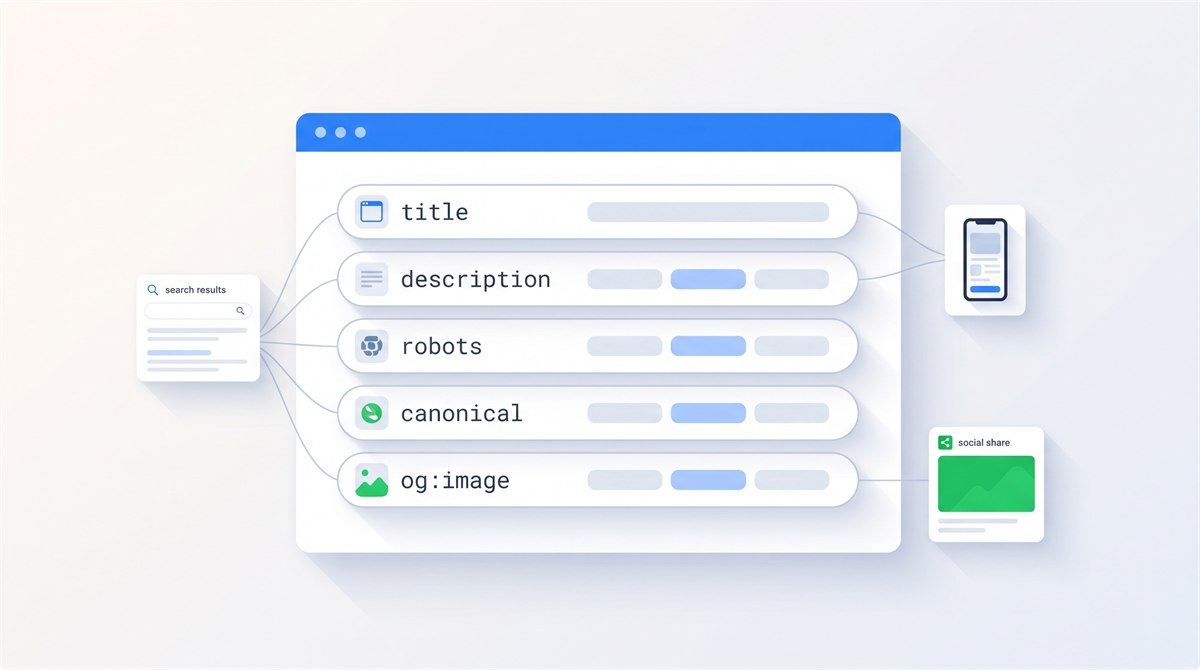
SEO meta tags describe a page or give indexing and preview instructions. On-page SEO also includes the visible heading, content and internal links. Your title and description influence how a result may appear; Google can choose different text. A canonical suggests a preferred URL, while robots rules control indexing and preview permissions, not whether a crawler can fetch the page.
Start with the errors that change what readers or search engines receive: a title copied across several services, an inaccurate description, or a leftover noindex rule on a public page. Check the published page, not only the fields in your editor.
Below you'll find what each tag does, what the data says Google actually does with it, copy-paste code for all of them, and a free snippet preview tool to test your own titles and descriptions before you publish.
What Are SEO Meta Tags?
Meta tags are instructions for machines. Your visitors never see them. Search engine crawlers, browsers, and social platforms read them on every request and use them to decide three things: what your page is about, how to display it, and whether to index it.
They all live inside the <head> element, before any visible content. A minimal, healthy head section looks like this:
<head>
  <meta charset="UTF-8">
  <meta name="viewport" content="width=device-width, initial-scale=1.0">
  <title>Your Page Title</title>
  <meta name="description" content="What this page delivers, in one or two sentences.">
  <link rel="canonical" href="https://example.com/this-page/">
</head>
The title is a <title> element and the canonical is a <link> element. Neither is technically a meta tag. The H1 is a visible heading in the body. They belong in the same on-page review, but they do different jobs.
| Element | Job | Practical check |
|---|---|---|
| Title | Names this specific page | Does it describe the answer or service rather than repeat a keyword list? |
| Meta description | Offers a possible search snippet | Does the summary match what the visitor will actually find? |
| H1 | Introduces the visible content | Can someone identify the purpose without reading the menu? |
| Robots | Sets indexing and preview rules | Is noindex intentional, and can crawlers access the rule? |
| Canonical | Suggests the preferred duplicate URL | Does it point to the correct final page? |
| Open Graph | Supplies sharing metadata | Do the title and image fit this page rather than the homepage? |
Do Meta Tags Still Matter for SEO?
Yes, but not equally, and not the way most people assume. Three of them influence rankings directly or through indexing (title, robots, canonical). One influences clicks rather than position (description). The rest handle rendering and sharing. Knowing which bucket a tag belongs to tells you how much effort it deserves.
There's a second reason to care that gets far less attention: Google can generate different title links and snippets. The numbers are bigger than most site owners expect.
These are historical study samples, not current rewrite rates for your website. A rewritten result does not prove your tag is poor: Google can adapt text to the query and page content. Use the studies as context, then check your own results.
Title Tag: Describe the Page Clearly
Ranking factorA specific title helps readers identify the page. Google can also use headings and other text when generating a title link. Its title-link guidance recommends descriptive, concise titles without repetitive boilerplate or keyword stuffing.
<title>SEO Meta Tags: Free On-Page SEO Guide (2026)</title>How long should a title tag be?
About 50 to 60 characters can be a useful drafting target, not a Google limit. Display width and wording matter. Keep the subject clear rather than removing a useful word just to satisfy a counter. The historical study below describes its sample; it does not establish a universal rule.
Title tag best practices
- One unique title per page. Different pages need distinctive labels so readers and search engines can tell them apart.
- Put the main keyword near the front. Searchers scan the first words, and truncation eats the end, never the beginning. Choose it through a keyword research process that starts with the audience and task, not volume alone.
- Match the search intent. If page one is full of guides, a product page may not satisfy the same learning task. Use this search intent guide to identify the task and choose the right page type before polishing the tag.
- Prefer dashes over pipes as separators. Zyppy found Google strips pipes from 41% of titles but dashes from only 19.7%.
- Keep your title and H1 aligned. When both contained the same number, Google preserved it in 97.3% of displayed titles.
- Write for the click, not the crawler. A title that reads like a keyword list gets rewritten. A title that promises something specific gets clicked.
Meta Description: Your Free Ad Copy in Search Results
Affects clicksGoogle has been clear for years: the meta description is not a ranking factor. So why write one? Because it's the only ad copy you'll ever get for free. Two lines of text under your title, shown to people who are actively searching for what you do. A description that answers the searcher's question earns the click that the ten blue links are fighting over.
<meta name="description" content="Which SEO meta tags still matter in 2026: title, description, robots, canonical, Open Graph. Real study data, examples, and a free snippet preview tool.">Now the honest caveat. Ahrefs compared hardcoded descriptions against live desktop snippets across 20,000 keywords and found Google rewrites them 62.8% of the time. For long-tail queries it climbs to 65.6%. Google builds its own snippet from your page text whenever it thinks that serves the query better.
Write a useful description for each important page, but do not assume it will always appear. Google primarily builds snippets from visible content and sometimes uses the description. Its snippet guidance explains why different searches can produce different summaries.
Meta description best practices
- Lead with the useful detail. A 140 to 160 character draft is a convenience, not a fixed display limit. Snippets vary with the query, device and available space.
- Include the keyword once. Google bolds query words in snippets, and bold text pulls the eye.
- State what the page delivers, specifically. "Learn more about our services" tells the searcher nothing. Numbers, outcomes and specifics win clicks.
- Use active voice and address the reader. It's ad copy. Write it like ad copy.
- Never duplicate descriptions across pages. Write a page-specific summary. Google can still select a snippet from visible content, even when the description is duplicated.
Meta Robots: Control Indexing and Search Previews
Controls indexingThe robots meta tag is the most dangerous tag on this page. Used well, it keeps thin and duplicate content out of the index so your strong pages get the attention. Used badly, it removes your site from Google and nobody notices for months.
A public page carrying a leftover staging noindex can disappear from search after Google processes that rule. That is different from a robots.txt block, which prevents crawling. Check both before assuming a content rewrite will fix an indexing problem.
<!-- Keep a page out of search results but let Google follow its links -->
<meta name="robots" content="noindex, follow">
The directives that matter
Google documents the full list of robots directives it supports. These are the ones you'll actually use:
| Directive | What it does | Typical use |
|---|---|---|
index | Allows the page in search results. This is the default, so you never need to declare it. | Nothing. Omit it. |
noindex | Removes the page from search results. | Thank-you pages, internal search results, thin archives |
nofollow | Stops Google from following any link on the page. | Pages full of untrusted or paid links |
noarchive | Ignored by Google Search; its cached-link feature has been removed. | Do not add it for Google cache control |
nosnippet | Prevents text snippets and video previews; a static image may still appear. Also restricts direct use in Google AI Overviews and AI Mode. | Content you don't want quoted |
max-snippet:[n] | Caps the snippet at n characters. | Publishers limiting reuse |
max-image-preview:[size] | Sets image preview size: none, standard or large. | Use large if you want Discover traffic |
unavailable_after:[date] | Drops the page from results after a date. | Expiring offers, event pages |
notranslate | Stops Google from offering a translated version. | Pages where translation breaks meaning |
Three robots mistakes I keep finding in audits
- Blocking a noindexed page in robots.txt. If crawlers can't fetch the page, they never see the noindex, and the URL can linger in results anyway. Let Google crawl it so it can read the instruction.
- Shipping staging tags to production. Developers noindex the staging site (correctly), then deploy the template with the tag still in it. Check your head section after every redesign.
- Forgetting non-HTML files. A meta tag can't go inside a PDF. Use the
X-Robots-TagHTTP header for PDFs, images and feeds. Most guides skip this entirely, then wonder why gated PDFs rank.
Canonical Tag: Identify the Preferred Duplicate URL
Consolidates signalsA page can have duplicate addresses, such as a clean URL and a tracking-parameter version. A canonical suggests which equivalent page should represent the group. Google may already recognize duplicates; it is not accurate to assume every alternate URL automatically splits your rankings.
<link rel="canonical" href="https://example.com/this-page/">- Every indexable page should carry a self-referencing canonical. It makes your preferred address explicit, including when tracking parameters create alternate URLs.
- Always use the absolute URL, including protocol and domain. Relative canonicals are a classic source of quiet disasters.
- It's a hint, not a command. Google can ignore a canonical that contradicts stronger signals like redirects and internal links. If the variants also need consolidating at the server level, use a 301.
- One canonical per page. Conflicting canonical targets can be ignored. Keep one consistent declaration rather than relying on competing plugin output.
For the decision about retiring or retaining a page, read canonical tags vs. 301 redirects. For duplicate products, parameter URLs, pagination, PDFs and cases where Google selects a different URL, see the full canonical URL implementation guide.
Viewport and Charset: Two Tags You Set Once
RenderingThese two take thirty seconds and you never touch them again. The viewport tag tells browsers how to scale your page on phones. Google has treated mobile-friendliness as a ranking consideration since 2015, and a missing viewport tag is the fastest way to fail it. The charset declaration sets character encoding so text renders correctly. Use UTF-8, which is what Google recommends.
<meta charset="UTF-8">
<meta name="viewport" content="width=device-width, initial-scale=1.0">
Open Graph tags decide what appears when your link lands in Facebook, LinkedIn, Slack, WhatsApp, iMessage or Discord. Without them, platforms guess, and the guess is usually a random image with a truncated sentence. Since a shared link is often someone's first contact with your site, the preview deserves the same care as the title tag.
<meta property="og:type" content="article">
<meta property="og:title" content="Your Headline for Social Shares">
<meta property="og:description" content="One sentence that makes the link worth tapping.">
<meta property="og:url" content="https://example.com/this-page/">
<meta property="og:image" content="https://example.com/share-image.jpg">
<meta name="twitter:card" content="summary_large_image">- Make the og:image 1200 by 630 pixels. That's the standard large-preview size across platforms, and smaller images get demoted to a thumbnail layout.
- Use absolute URLs for og:url and og:image. Relative paths break previews on several platforms.
- X falls back to Open Graph when its own tags are missing, so the one twitter:card line above is usually all you need from that family.
- Test before you share. LinkedIn's Post Inspector and Meta's Sharing Debugger show you the exact preview and let you refresh a stale cache.
Test Your Meta Tags: Live SERP Snippet Preview
Type your title and description below and watch the Google-style preview update. The counters track characters and approximate pixel width, which is what Google actually truncates on. No signup, nothing gets sent anywhere, it all runs in your browser.

A Worked On-Page SEO Example
Imagine a fictional bicycle workshop page that explains puncture repairs, prices and booking. "Home | Bikes | Best Bikes" gives a visitor little reason to choose it. A clearer page might use:
<title>Bicycle Puncture Repairs in Bristol | Example Workshop</title>
<meta name="description" content="See bicycle puncture repair options, what the service includes and how to book at our Bristol workshop.">
<!-- In the page body, not the head: -->
<h1>Bicycle puncture repairs in Bristol</h1>
The title identifies the service and place. The description previews information the page must actually contain. The H1 names the visible subject. Do not copy the city, service or business name unless they describe your page.
How to check your published tags
- Publish one representative page and open its source. Search for the title, description, robots and canonical elements.
- Inspect the rendered DOM too if scripts can change the head. Look for duplicate or conflicting output from templates and plugins.
- Compare the H1, title and actual answer. They can use different wording without describing different subjects.
- Use Search Console to review relevant queries and equal date ranges after recrawling. A changed snippet or a handful of impressions is not proof of a ranking gain.
The preview tool above is an approximation for writing, not a screenshot of what Google promises to show.
Meta Tags You Can Safely Delete
Half the meta tags floating around CMS templates do nothing. Some have done nothing for fifteen years. Here's the honest split, based on Google's own list of supported tags.
Worth your time
<title>on every page, concise and distinctivedescriptionon pages that earn search trafficrobotswhere indexing needs controlcanonicalself-reference on every indexable pageviewportandcharset, set once- Open Graph plus
twitter:card
Delete on sight
keywords: ignored by Google since 2009, a spam signal for Bing since 2011revisit-after: never supported by any major enginehttp-equiv="refresh"redirects: use a server-side 301 insteadgenerator: advertises your CMS version to attackers, helps nobodynositelinkssearchbox: the feature it controlled no longer exists
Meta Tags and AI Search
Search traffic increasingly arrives through AI answers: Google's AI Overviews, ChatGPT, Perplexity and friends. Your meta tags are part of how these systems read your site, and the controls overlap almost entirely with classic SEO.
- Snippet controls apply to AI features. Google documents that
nosnippet,data-nosnippet,max-snippetandnoindexlimit how your content appears in its AI experiences, the same way they limit classic snippets. Blocking snippets now also means opting out of AI answer visibility, so use them deliberately. - Clear titles help citation. AI assistants show your title and description when they cite a source. A vague title makes an unclickable citation.
- Training opt-outs live in robots.txt, not meta tags. The
Google-Extendedtoken controls whether your content trains Gemini models, and it has no effect on your Search rankings. Different lever, different file.
My position, since an expert should have one: don't block AI systems from content you want customers to find. The sites winning AI citations are the ones with clear, well-structured, honestly labeled pages, which is exactly what classic on-page SEO builds anyway.
Copy-Paste Meta Tag Template
Here's the full head section I start every project with. Replace the placeholder text, delete the comments, done.
<!-- Essentials -->
<meta charset="UTF-8">
<meta name="viewport" content="width=device-width, initial-scale=1.0">
<title>Primary Keyword: Specific Benefit (Brand)</title>
<meta name="description" content="A concise summary of what this page delivers for the reader.">
<link rel="canonical" href="https://example.com/this-page/">

<!-- Only when you need to change the default (index, follow) -->
<meta name="robots" content="noindex, follow">

<!-- Social sharing -->
<meta property="og:type" content="article">
<meta property="og:title" content="Primary Keyword: Specific Benefit">
<meta property="og:description" content="One sentence that makes the link worth tapping.">
<meta property="og:url" content="https://example.com/this-page/">
<meta property="og:image" content="https://example.com/share-image-1200x630.jpg">
<meta name="twitter:card" content="summary_large_image">
On-Page Meta Tag Checklist
Run this against any page in ten minutes. If all ten pass, your head section is in better shape than most of the web.
The 10-point check
- Unique, descriptive title with the useful subject near the front
- Title matches what page one already rewards for the query
- Accurate, page-specific description with the useful detail first
- Self-referencing canonical with the absolute URL
- No unintended
noindexanywhere (check after every deploy) viewportandcharsetpresent in the first lines of the head- Open Graph set, share image at 1200 by 630 pixels
meta keywordsand other dead tags removed- Title and H1 telling the same story
- Verified in View Source on the live page, not in the CMS editor
Want Me to Check Your Site's Head Section?
Request a free review of a small selection of public pages. I will email up to five priority findings or next steps. A comprehensive audit or implementation project can be scoped separately.
Request a free reviewSEO Meta Tags: FAQ

I'm a developer who moved into technical SEO. I audit sites, then implement the fixes myself: indexing, Core Web Vitals, structured data, rendering. If your site has a problem hiding in its head section, I'll find it. Request a free website review and I'll take a look personally.
Open Graph and Twitter Cards: Own Your Share Preview
Social sharing